Zush vs Files Magic AI (2026): Renamer or Mac Organizer?

Jump to section
Quick answer: pick Files Magic AI if you want one Mac app that proposes a new folder structure, renames files, and cleans up duplicates and developer caches. Pick Zush for content-aware names and optional AI folder groups (beta): it gives you more control over how names are built, watches folders for new files, keeps a full undo history, and also runs on Windows.
Both offer renaming and folder organization. Compare how they analyze files, control names and groups, automate new arrivals, and handle cleanup.
Last checked: September 24, 2026. Written by the maker of Zush. Files Magic AI details come from its official page.
Side by side
| Zush | Files Magic AI | |
|---|---|---|
| Main job | Renames by content and optionally sorts into AI folders (beta) | Reorganizes folders, renames, cleans the system |
| Platforms | Mac (macOS 15+) and Windows 10/11 | Mac only (macOS 12+) |
| Moves files into folders | Yes, optional AI sorting (beta) | Yes, proposes a folder structure |
| Naming control | Templates, 145+ Naming Blocks, Custom AI Blocks, case, separators, language | Magic Rename suggestions |
| File types | 100+: images incl. RAW/HEIC, PDFs, Office/iWork, design files, video, audio | PDFs, spreadsheets, presentations, photos (with OCR) |
| Where AI runs | Zush Cloud AI, BYOK, or local Ollama / LM Studio | Rename: on device (Apple Intelligence, built-in model, or optional LLM). Organize: filenames sent to the cloud |
| Watches folders | Yes | Yes, automatic Magic Rename for selected folders |
| Undo | Full Rename History with batch revert | Undo for recent actions |
| Extras | Finder tags and Spotlight metadata | Duplicate finder, unused apps, dev cache cleanup |
| Price | 50 free renames; $10/mo or $48 one-time | $4.99/mo, $29/yr (discounted), or $49.99 lifetime; 7-day trial on yearly |
What Files Magic AI does well
Files Magic AI bundles three tools:
- Organization. It looks at your filenames and proposes a folder structure, which you preview, adjust, and apply.
- Magic Rename. It reads file contents on your Mac and suggests names, for example
Scan_0043.pdfbecoming2026-03-14_Invoice_Acme-Studios.pdf. The vendor documents three local engines—Apple Intelligence, a built-in model, and an optional Rename LLM—plus watched folders for automatically renaming new files. - System Cleaner. It finds duplicates, unused apps, and caches such as
node_modules, Xcode, Flutter, and Gradle.
For privacy, the vendor says file contents stay on your Mac; only filenames are sent for AI organization. It supports locally available iCloud, Dropbox, and Google Drive folders.
It is a good fit if you want one inexpensive utility for a messy Mac and you are comfortable letting an app move files.
What Zush does differently
Zush combines detailed filename controls with optional content-based folder sorting (beta).
You decide the shape of every name. Pick a ready-made Template (Screenshots, Bookkeeper Expenses, Photographer Shoots, Client Meeting Notes, and others) or build your own from Naming Blocks: date, vendor, amount, client, scene, capture date, document type. Custom AI Blocks let you ask for any field in plain language. The result is a name that follows the same pattern every time:
scan_0042.pdf→2026-09-12_acme_invoice_1042_1250usd.pdfScreenshot 2026-09-18 at 14.12.03.png→stripe-revenue-dashboard-september.pngDSC01877.ARW→2026-06-14_wedding_first_dance.ARW
New files are handled automatically. Folder monitoring renames files as they land in Downloads, Screenshots, or a scanner folder.
Nothing is permanent. Rename History records original name, new name, folder, and time for every batch, and restores it whenever you need.
It covers more file types, including RAW photos, PSD, Figma, Sketch, Illustrator, video, and audio.
It works on Windows too, with the same Templates and AI modes.
Zush optionally sorts files into AI-named folders (beta) and lets you choose a destination. It does not clean up disk space.
Sort mixed files into folders with AI
Zush can give supported files descriptive names and group them into real folders by content in the same batch. AI folder sorting is in beta on Mac and Windows. Leave Folder rules empty for Auto grouping, or describe the groups in plain language. For mixed files, try:
Group invoices by company and receipts by month.
- Add a small copied batch in AI Rename and select a Template.
- Enable + Sort and choose the Destination folder, which is the root for the sorted subfolders. Without a separate destination, the source folder remains the root.
- Enter the grouping instruction in Folder rules. Naming Blocks set the filename format separately.
- Enable Reuse existing folders if suitable groups already exist inside the destination root. Zush can create a new folder when none fits.
- Review both the proposed names and folder groups. Correct folder names or file placement before applying the batch.
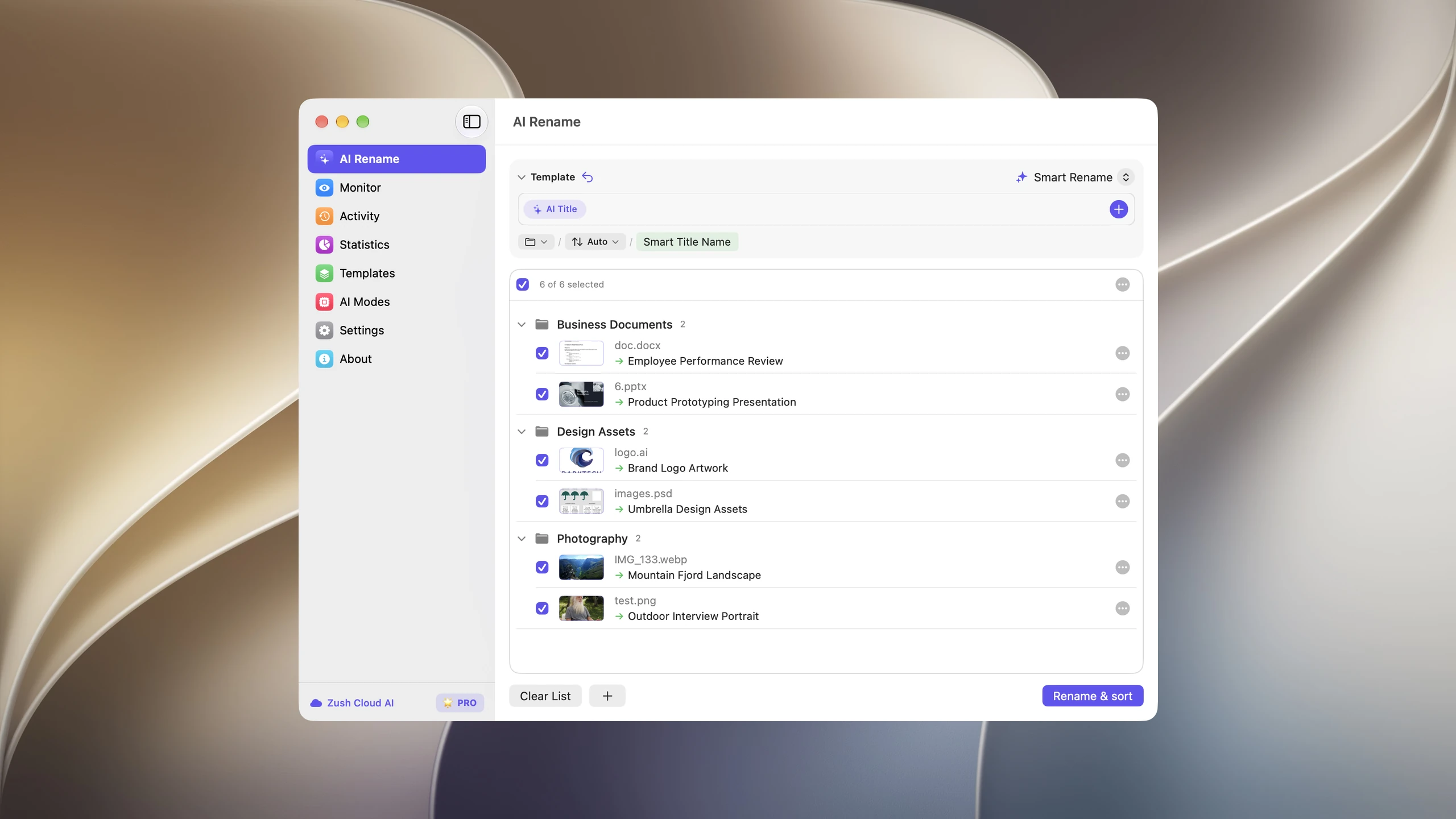

Save the tested destination and rules in the Template. Assign it to Monitor to rename and sort new files arriving directly inside the watched folder. This does not retroactively reorganize files already processed. With sorting off and the original destination selected, files keep their current folder.
Follow the step-by-step Mac sorting guide or see the folder sorting documentation and 30 example Folder rules.
Privacy compared
Both apps can keep file contents on your computer:
- Files Magic AI’s Magic Rename runs on device. Its folder organization sends filenames, not contents, to the cloud.
- Zush’s local modes (Ollama or LM Studio) keep analysis on your Mac or PC. Zush Cloud AI and BYOK send file content to the selected cloud model to generate names.
For sensitive folders, use Files Magic AI’s Magic Rename or Zush with a local model.
Price compared
| Year 1 | 3 years | |
|---|---|---|
| Zush one-time | $48 | $48 |
| Zush monthly | $120 | $360 |
| Files Magic AI lifetime | $49.99 | $49.99 |
| Files Magic AI yearly (current discount) | $29 | $87 |
On lifetime pricing they cost about the same. The choice comes down to the job, not the price.
Which one should you pick?
- You want your Mac tidied: new folders, duplicates removed, caches cleared: Files Magic AI.
- You want every file to have a clear, consistent name you can search for: Zush.
- You also use a Windows PC: Zush.
- You rename video, RAW photos, or design files: Zush.
Some people use both: Zush for naming, Files Magic AI for cleanup. Keep them on separate folders so two tools are not changing the same files.
FAQ
Is Files Magic AI available for Windows?
No. Files Magic AI is Mac only and requires macOS 12 or later. Zush runs on both Mac and Windows.
Does Files Magic AI upload my files?
According to the vendor, file contents stay on your Mac. For folder organization, only filenames are sent to the cloud; Magic Rename runs on device.
Can Zush organize files into folders like Files Magic AI?
Yes. Zush offers optional AI folder sorting (beta) and destination folders. Review the proposed groups before applying a batch.
Which is cheaper, Zush or Files Magic AI?
On lifetime plans they are close: $48 for Zush, $49.99 for Files Magic AI. Files Magic AI’s discounted yearly plan is $29; Zush monthly is $10.


